
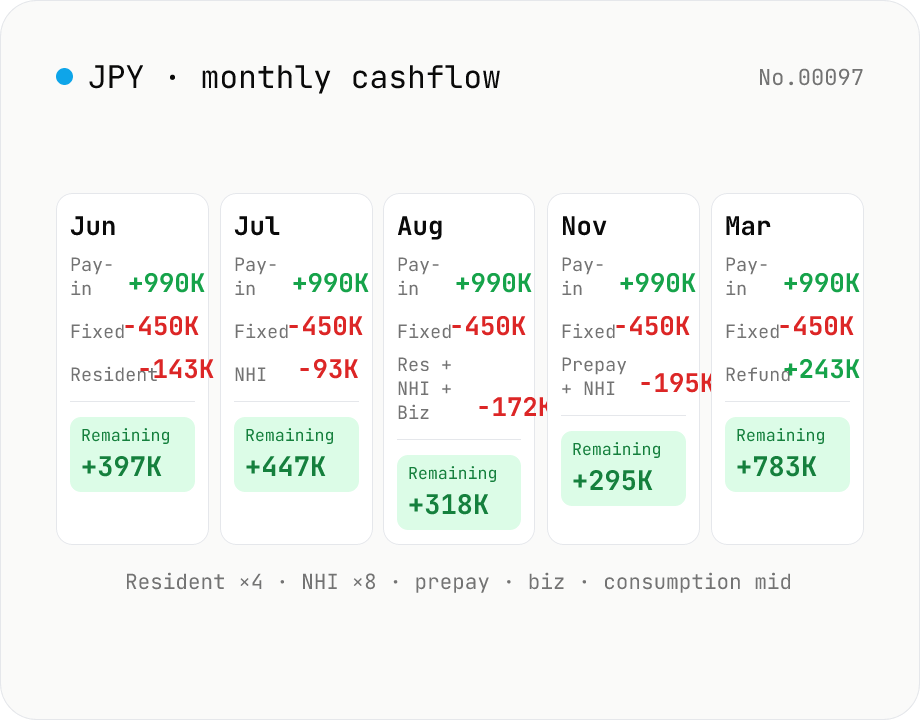
JP freelancer tax & cash-left simulator — monthly cashflow
Lays out monthly income, expenses, fixed costs, and every tax due date (income tax prepayments, resident tax 4 instalments, NHI 8 instalments, business tax, consumption tax mid-year) on a per-month calendar for Japanese sole proprietors. Shows how much you can put toward investments or savings each month, refunds included. Runs entirely in your browser.
How to use
Enter monthly income, business expenses, fixed outflows, payday, and current bank balance (starts blank; inputs are auto-saved in your browser). Enter the annual income-tax deduction total (basic + social insurance + iDeCo + shokibo + spouse/dependents, summed) and the income tax withheld at source. Enter annual consumption tax, business tax rate, and the resident-tax flat portion. Business tax and consumption tax can be excluded via the checkboxes. Pick Auto (Tokyo unified FY2026 rates) or Manual entry for National Health Insurance. Auto mode lets you add the nursing-care portion if you are 40–64. Enter the simulation start (year / month). The simulation always ends in March of the following year. Click Run to see a horizontally-scrolling calendar with each month's pay-in, outflows, every tax instalment, remaining cash, and running balance. The summary lists annual burden per tax and period totals.
In depth
Why a freelance tax calendar exposes sensitive business intelligence
The inputs to this tool — monthly revenue, expenses, bank balance, income deductions, consumption tax amount, business tax rate, and NHI premium — collectively describe a freelancer’s entire financial picture. Monthly income variation reveals the seasonality and stability of the business. Expense levels signal the industry and scale of operations. Bank balance shows liquidity. Together, these match exactly what a counterparty or lender would want to know about a sole proprietor before entering a contract.
Tax-calendar tools are used repeatedly — monthly or at every payment deadline — which means a server-side version accumulates a multi-year record of business activity. That’s substantially more sensitive than a one-off calculation.
The privacy gap between cloud tax tools and browser-based ones
Cloud accounting and tax SaaS products store data on their servers as a core feature. Unlike a licensed tax accountant (who is bound by 税理士法 Article 38 confidentiality), a SaaS provider has no statutory obligation of secrecy toward a user. Terms of service typically permit access for ‘service improvement’, security purposes, and legal obligations — which can mean the data is accessible to staff, legal demands, or acquirers if the company is sold.
This tool keeps everything in your browser. Inputs are saved to localStorage on your own device — they restore next session without ever leaving the machine.
How the tax-schedule computation works without any network call
Income-tax prepayments (予定納税), resident-tax quarterly payments, NHI’s eight annual instalments, business-tax biannual payments, and consumption-tax mid-year instalments are all computed in JavaScript using your inputs and the FY2026 Tokyo unified NHI rate table embedded in the code. The monthly calendar grid is then assembled in the browser and rendered without any server query.
Open DevTools Network while running a simulation: after the initial page load, nothing fires. All rate tables are bundled into the page itself and can be inspected in the site’s public GitHub repository.
Planning ahead for the months when taxes pile up
Two months consistently create cash-flow pressure for Japanese freelancers: July (resident tax Q1 + income-tax prepayment 1) and November (resident tax Q3 + prepayment 2). Visualising the full-year schedule here lets you set aside the right amount each month rather than scrambling when the payment slips arrive. The FY2026 rates used here will update with each annual tax reform — re-verify the key figures when the fiscal year changes. To project this-year due amounts from last year’s filed return, freelance-tax-calendar-prev-jp takes that side; for an annual headline figure without the monthly grid, freelance-tax-jp covers it — both stay browser-only.
Why each tax has its own due-date schedule and statutory basis
A Japanese freelancer’s tax calendar comes from five overlapping statutes, each with its own assessment cycle. Resident tax (Local Tax Act Article 320) is collected in four quarterly installments (late June, August, October, January) and is based on the prior year’s income — so a first-year sole proprietor faces no resident-tax burden. National Health Insurance tax (NHI Act Article 76 plus local ordinances) is collected in eight installments from June through January in Tokyo’s 23 wards under the FY2024 unified rate consolidation. Income-tax prepayment (Income Tax Act Article 104) applies when prior-year final income tax was JPY 150k or more; one-third is paid by July 31 and another third by November 30.
Consumption tax interim payments (Consumption Tax Act Article 42) scale with the prior year’s consumption tax: one payment (August) above JPY 480k, three payments (May, August, November) above JPY 4M, and eleven monthly payments above JPY 48M. Business tax (Local Tax Act Article 72-2) applies to business income above JPY 2.9M; two payments due August 31 and November 30. The intersection produces two pressure months: July (resident-tax Q1 + prepayment 1 + NHI Q2) and August (NHI Q3 + consumption interim + business-tax Q1). Visualising these stacked due-dates is what makes this calendar useful for cash-flow planning.
Blue-return deduction tiers and the e-Tax filing requirement
The Blue Return deduction (青色申告特別控除) has three tiers after the 2020 reform: JPY 650k, JPY 550k, and JPY 100k (source: NTA Tax Answer No.2072). The JPY 650k tier requires (1) double-entry bookkeeping, (2) attaching the balance sheet and income statement, and (3) electronic filing via e-Tax or electronic ledger storage. Without e-Tax, the deduction drops to JPY 550k. The JPY 100k tier is open to single-entry bookkeeping but covers only real-estate income, business income, and timber income — miscellaneous income is excluded entirely.
The push toward electronic filing has expanded gradually: large corporations have been required to e-file since 2020, and sole proprietors now face strong incentives. Setting up e-Tax requires a My Number card, a card reader (or smartphone NFC), and a one-time application for an e-Tax user ID. The setup burden is real, but the JPY 650k deduction saves about JPY 20k per year at a 20% marginal rate — recovered in the first year for most freelancers. This tool assumes the JPY 650k deduction when ‘blue-return’ is selected, computing business income as revenue − expenses − 650k. If your filing falls back to JPY 550k or JPY 100k, the income-tax, resident-tax, and NHI figures shown here will all be understated. Confirm your blue-return application status before the February 16 – March 15 filing window.
FAQ
- Is anything I enter uploaded?
- No. The simulator runs entirely in your browser; no income, balance, or expense data leaves the page. Inputs are stored in your browser's localStorage and restored next time you open the tool.
- Which rates does NHI auto-calc use?
- It uses Tokyo's unified FY2026 NHI premium rates. Municipal rates vary a lot — check your billed amount or switch to manual entry for the accurate figure.
- Aren't resident tax and NHI based on the previous year's income?
- Strictly yes. This is a simple simulator that uses the entered monthly income × 12 as the current-year basis and lays the resulting amounts onto the current-year due-date schedule. Refer to your prior-year tax notice for exact figures.
- How are income-tax prepayments triggered?
- Officially they kick in when the prior year's final income tax is JPY 150,000 or more. This tool uses the current-year predicted income tax instead — if it's JPY 150,000+, one third is scheduled for end-July and another for end-November.
- What about consumption-tax mid-year payments?
- Annual liability over JPY 480,000 up to JPY 4M triggers one instalment (end-August); JPY 4M to 48M triggers three (end-May / Aug / Nov). The 11-instalment case (above JPY 48M) is not supported.
- How do I skip business or consumption tax?
- Uncheck the corresponding option. The tax disappears from the calendar, the summary, and the period totals.
- How are refunds shown?
- A refund at final filing shows as a positive value in March's row and is added to the period-total refunds line.
How to verify nothing is uploaded
This tool never sends your input outside your browser. The pages below explain how it works, how to audit it, and how the site is run.
Related tools
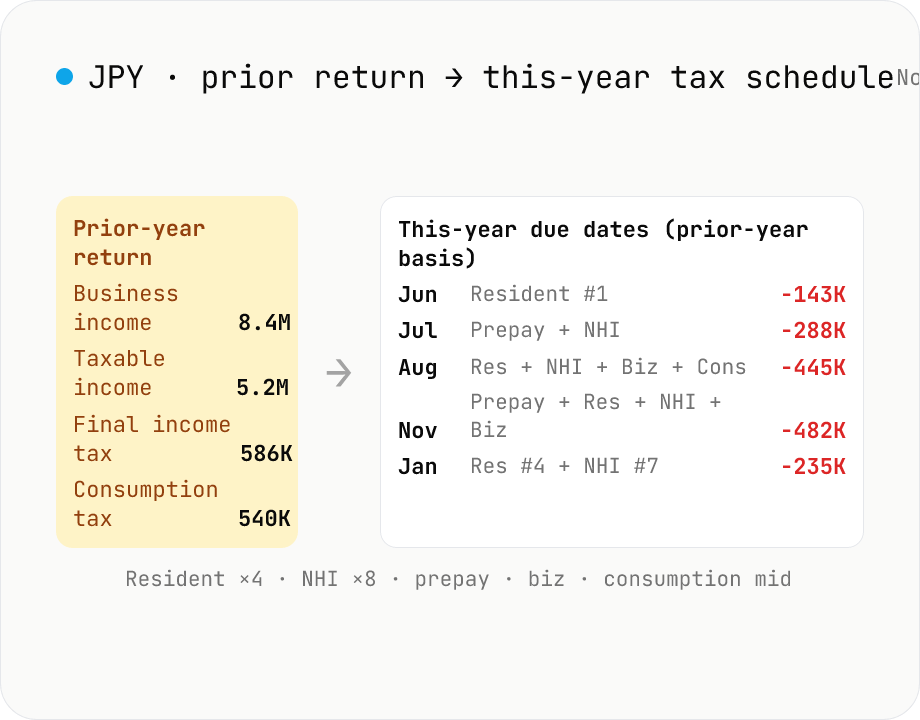
JP freelancer this-year tax schedule (from prior return) — monthly cashflow
Builds a per-month calendar of this year's tax due dates and amounts (resident 4×, NHI 8×, business tax, income-tax prepay 2×, consumption mid-year) directly from your prior-year return (business income, taxable income, final income tax, consumption tax). Add this year's income, expenses, and fixed costs to see how much cash is left each month. Runs entirely in your browser.
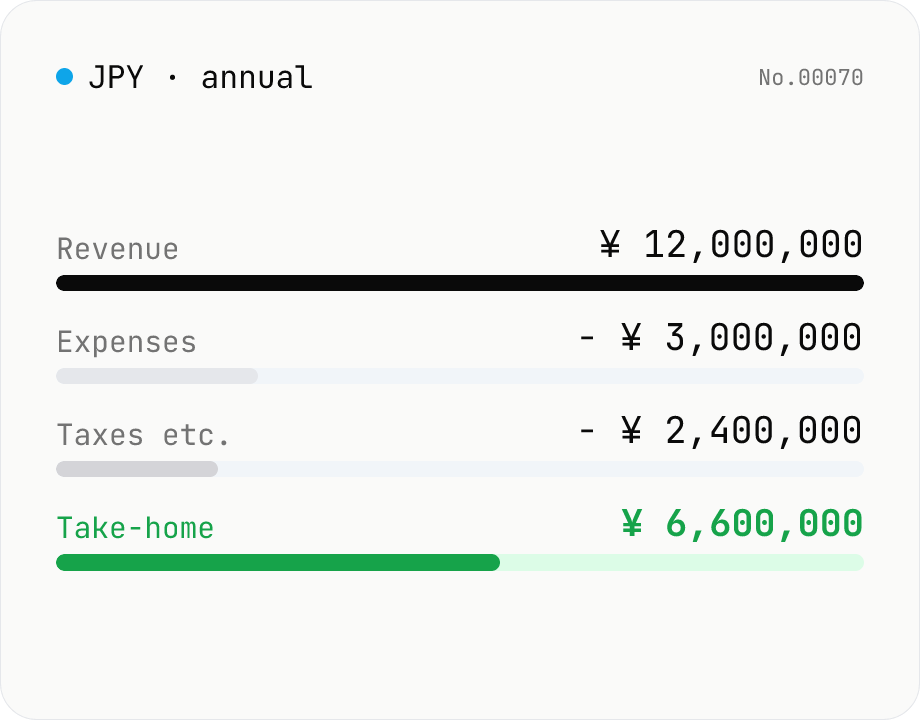
Japan Freelance Tax Calculator — Income, Resident, Health, Business Tax
Free online Japan freelance / sole-proprietor tax calculator. Annual estimator covering income tax, resident tax, consumption tax, national health insurance, business tax, and furusato-nozei cap. Useful for kojin jigyō nushi planning their year-end provisional tax. Runs entirely in your browser — figures never leave your device.
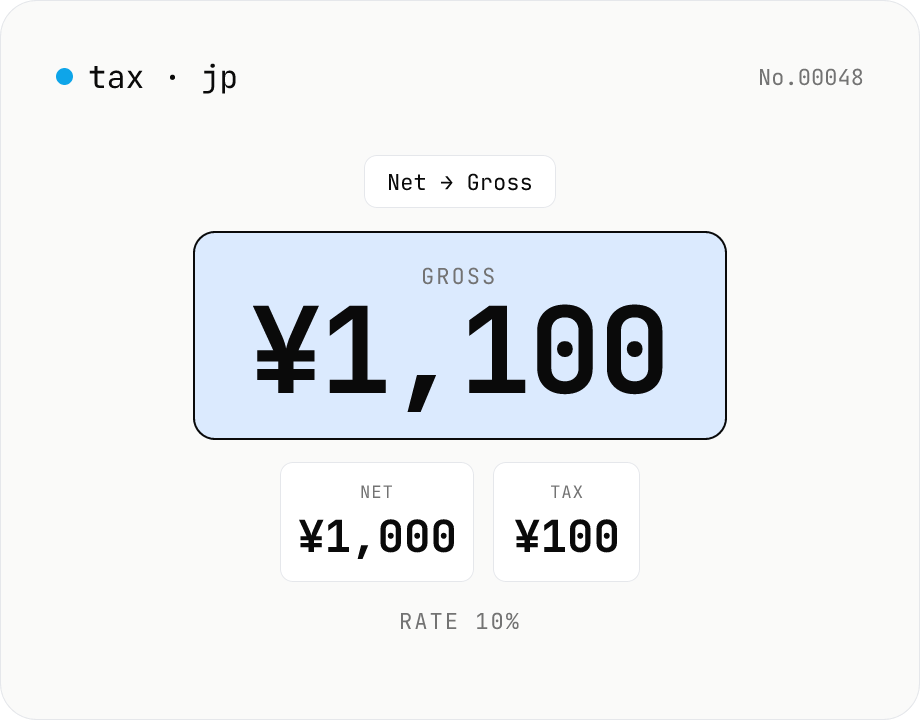
Japan Consumption Tax Calculator — 10% / 8% Net ↔ Gross
Free online Japanese consumption tax (shōhizei) calculator. Convert net ↔ gross both ways at the 10% standard rate, 8% reduced rate, or a custom rate, and see net, tax, and gross amounts together. Selectable rounding (floor / round / ceiling). Runs entirely in your browser — no amounts are uploaded.
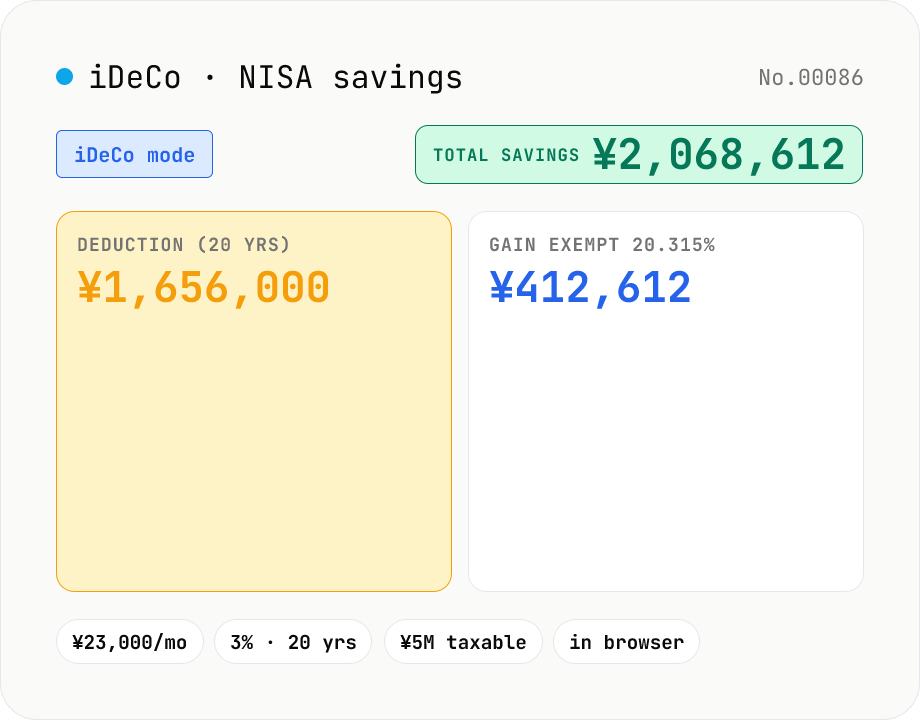
iDeCo / NISA tax-savings calculator — Japan tax-advantaged investing
Estimate the tax savings of Japan's two main tax-advantaged investment accounts. iDeCo mode tallies the annual income-tax + 10% resident-tax deduction on contributions (using the progressive bracket table) AND the 20.315% capital-gains exemption. NISA mode only applies the 20.315% gain exemption. Compare against the after-tax outcome of doing the same monthly contributions in a regular taxable brokerage account. Runs entirely in your browser — your figures never leave the device.